Objective
This guide can help marketers, founders, and product teams select designs that function in real workflows of products. We concentrate on speed and clarity, AI support, and features that are user-friendly with no gimmicks or nonsense.
Key Takeaways
AI-led design is now a core part of product building, not a side task
Free tools work well for early testing; paid tools make sense once teams grow
Builders need tools that fit MVPs, landing pages, UI, and marketing, together
Choosing the right tool saves weeks of rework and handoffs
Introduction
Design no longer rewards those who look artistic, it rewards those who get usable visuals live faster.
The thing is that design in 2026 doesn't mean having a degree in design in the future. It's about being able to make clear, user-friendly images that allow your product to advance quickly. Teams today move fast, test ideas often, and push updates every week. That pace forces a shift in how we think about graphic design tools.
Industry reporting across product and SaaS platforms shows most modern teams now rely on AI-assisted design workflows to reduce turnaround time and cost. What this really means is simple: if your design tool slows you down, it hurts growth.
In this guide on the best graphic Design Tools for 2026 (Free and paid), we look at what is working for designers, marketers, and startups, using real workflows, not theories.
Table of Contents
Why Visual Design Matters More Than Ever in 2026
How AI Is Changing Day‑to‑Day Design Work
Free Design Platforms That Still Pull Their Weight
Paid Graphic Design Platforms That Support Scaling Teams
Free vs Paid Graphic Design Tools: What Should You Choose?
Real‑World Use Cases from Product and Startup Teams
Quick Comparison: Which Tool Fits Your Team Best?
Expert Insights on Design and Speed in 2026
Frequently Asked Questions
Design Smarter in 2026: Final Takeaway for Builders
Call to Action: Compare Tools That Actually Fit Your Workflow
Why Visual Design Matters More Than Ever in 2026
Good visuals do more than look nice. They shape trust, guide users, and affect conversions from the first click. In product-led businesses, design now sits next to engineering and growth, not below them.
Modern teams rely on shared visual systems for landing pages, dashboards, onboarding screens, and marketing assets. That’s why flexible graphic design tools matter more than ever.
Design workflows that fit product teams
Design now supports:
MVP validation
Feature launches
Ads and social content
UI changes and experiments
AI-driven creative output
AI shortens setup time by:
Suggesting layouts
Adjusting spacing and hierarchy
Creating usable drafts faster
This shift helps non-designers work with confidence instead of waiting for handoffs.
How AI Is Changing Day-to-Day Design Work
AI didn’t replace designers; it changed how ideas become assets. Instead of starting with a blank screen, companies today begin with direction and then work from there to refine.
Structure and layout speedier support
AI takes care of the layout early so that teams can concentrate on the meaning and clarity.
Collaboration between teams without friction
Comments, shared files, and live updates decrease the back and forth between roles.
Free Design Platforms That Still Pull Their Weight
A graphic design software that is free could be sufficient when you are aware of its limitations. Many teams at the beginning of their development make use of free alternatives to experiment with ideas and verify the message.
Free tools can be a good idea; they make sense.
The best free tools are in situations where you require:
Early prototypes
Simple landing pages
Quick marketing visuals
UI drafts for discussion
Tool breakdown
Figma
Used widely for UI layouts and collaboration. Teams rely on it for interface planning and shared libraries.
CodeDesign
Helps founders shape landing pages without deep design skills. Useful for clear structure and clean layouts.
AgentUI
Focused on interface ideas for AI-driven products. Helps teams sketch flows before development.
Each option helps teams move faster without budget strain.
Paid Design Platforms That Support Scaling Teams
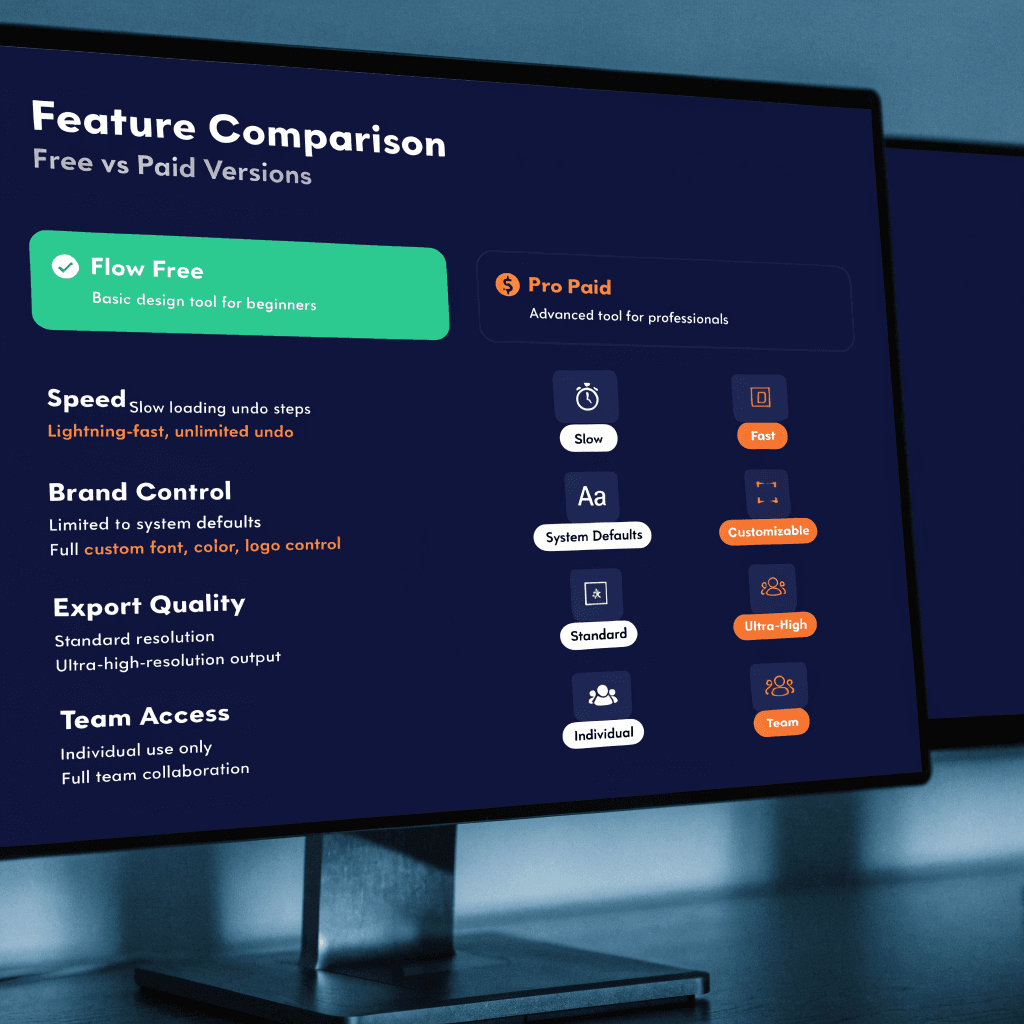
As teams grow, free tools start to feel limiting. This is where paid graphic design sites become useful, not because they look nicer, but because they reduce daily friction.
Why paid tools earn their cost
Paid tools support:
Brand control
Multi-user workflows
Better exports
Faster revisions
Tool breakdown
Webflow:- Used by many teams to move designs into live sites with fewer handoffs. Helpful for marketing and product pages.
TeleportHQ:- Supports UI work that balances design clarity with production needs.
WeWeb:-Strong fit for teams building real apps. Useful for turning layouts into working interfaces.
Paid tools save time once projects move beyond simple testing.
Free vs Paid: What Should You Use?
There’s no one answer. The choice depends on timing and goals.
Choose free when:
You’re testing early ideas
Team size is small
Speed matters more than polish
Choose paid when:
Brand consistency matters
You publish often
Multiple people work in parallel
Understanding this trade-off prevents wasted effort later.
Real-World Use Cases from Product Teams
Teams that are developing SaaS products typically start out with a no-cost graphic design platform to try out screens and send messages. When they begin to gain traction, they move onto paid graphics design websites to ensure quality is consistent on a larger scale.
Landing page testing
The founders design layouts, test copies, and test copies weekly, all without relying on agencies.
Dashboards and tools for internal use
Teams design interfaces before the start of the year so that the developers can build the correct thing at the initial time.
This technique cuts down revision cycles and allows everyone to align early.
Practical Comparison for Builders
Team Stage | Tool Type | Why It Fits |
Solo founder | Free | Quick tests, no cost |
Small startup | Mixed | Flexibility without lock-in |
Growing team | Paid | Control and consistency |
This table helps teams choose tools that match how they work today.
Expert Insight on Design and Speed
The product managers of SaaS teams have consistently noted that clear, well-designed UIs speed up sales cycles and boost the adoption of features. A clear UI improves trust and reduces the time users spend learning.
This insight is the reason most builders today view tools for design as a core part of their infrastructure and not just an extra.
Why This Matters for Builders in 2026
The right tools can save many weeks of revisions and can avoid costly revising. The top graphic design tools today provide speed, clarity, collaboration, and not only aesthetics.
Teams that consider design as a part of their build process ship more quickly and use less energy.
AIBuilderBattle.com concentrates on helping builders find the best tools for their use, not just marketing claims. Many of our readers depend on this approach to select tools that will work with their workflow. When used properly, these tools aid teams in avoiding poor matches and remaining focused.
Build Visuals That Move Work Forward
Graphic design tools should work the way your team works. When you pick tools that support real delivery, not just presentation, you reduce friction and stay focused on growth.
If you want side-by-side comparisons and builder-tested insights, AIBuilderBattle.com helps teams make informed choices without trial-and-error.
Start using tools that help you publish faster, test smarter, and stay aligned. Compare what works, skip what doesn’t, and keep your build moving forward.
Frequently Asked Questions
What are the Best graphic design tools for startups in 2026?
The best graphic design tools are dependent upon the platform. The first teams can have access to free tools such as Figma and Figma, while teams that are growing typically switch to paid alternatives like Webflow or WeWeb for greater control.
Is a no-cost graphic design software platform sufficient to be used for business?
Yes, early testing and basic assets. Once branding and scale become important, the paid tools will save you time.
What are the ways these tools make sense for builders with no code?
Many are compatible with workflows that do not require code, allowing teams to move from concept to release more quickly.
Do non-designers really use these tools well?
Yes. AI assistance and templates make them usable for marketers, founders, and PMs.